Student Feedback
India's most sought-after VJ course — learn Resolume Arena, live video mixing, LED stage mapping and projection mapping for real shows.
Watch feedback from students who completed the video jockey course — trained in VJing, Resolume Arena, and live stage visuals at PartyMap Academy.
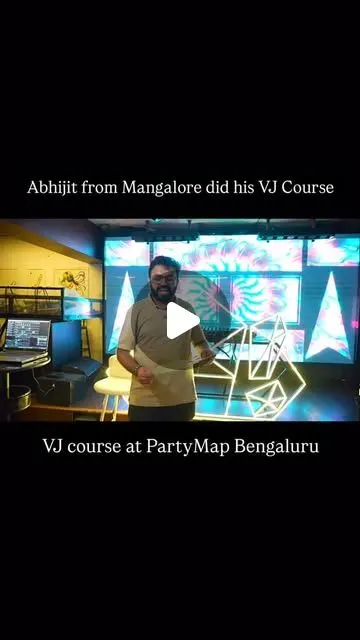
India's most sought-after VJ school. Students from 18+ countries have completed our visual jockey course — online and offline.
Video illusions behind every performer has become a craze. Videos transform an entertainers act and glorifies his stage presence. Today Visual Jockey are a must for every live outdoor stage events. Whether it is the New Year at Burj Khalifa or launch of an Audi car, VJs are everywhere. Learn live projection mapping technique & set your career on fire with this crash course
Play your videos when you want, how you want. Forwards, backwards, scratch, and adjust tempo to the beat.
Project video on any type of surface. Complex geometrical structures or whole buildings.
From projecting on booths to cars, buildings and LED mappings on giant stages like Ultra.
5 hrs / day. The course duration is 15 hours.
Eligibility: No prior knowledge is needed
12 days, 1 hr each day
Eligibility: Basic knowledge of LED field
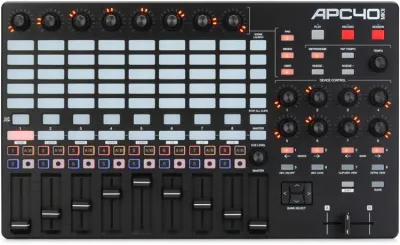 Akai APC40 MK2
MIDI controller for Resolume. Hands-on clip launching, effects and faders.
View on Amazon
Akai APC40 MK2
MIDI controller for Resolume. Hands-on clip launching, effects and faders.
View on Amazon
Learn projection mapping, LED stage mapping and live video mixing — skills used at concerts, club nights and corporate events worldwide.
Covers live VJing, Resolume Arena software, color theory, compositing, and projection mapping — as a 3-day bootcamp or a 12-day online VJ course.
Certification course by PartyMap Academy.
Everything you need to know — about VJing, Resolume Arena, and who this course is for.
VJing (pronounced: VEE-JAY-ing) is a broad designation for real-time visual performance. Characteristics of VJing are the creation or manipulation of imagery in realtime through technological mediation and for an audience, in synchronization to music. VJing often takes place at events such as concerts, nightclubs, music festivals, and sometimes in combination with other performative arts. This results in a live multimedia performance that can include music, actors, and dancers. The term VJing became popular in its association with MTV's Video Jockey but its origins date back to the New York club scene of the 70s. In both situations VJing is the manipulation or selection of visuals, the same way DJing is a selection and manipulation of audio. VJ hardware can be split into categories - 1. Source hardware generates a video picture that can be manipulated by the VJ, e.g. video cameras and Video Synthesizers. 2. Playback hardware plays back an existing video stream from disk or tape-based storage mediums, e.g. VHS tape players and DVD players. 3. Mixing hardware allows the combining of multiple streams of video e.g. a Video Mixer or a computer utilizing VJ software. 4. Effects hardware allows the adding of special effects to the video stream, e.g. Colour Correction units 5. Output hardware is for displaying the video signal, e.g. Video projector, LED display, or Plasma Screen. There are many types of software a VJ may use in their work, traditional NLE production tools such as Adobe Premiere, After Effects, and Apple's Final Cut Pro is used to create content for VJ shows. Specialist performance software is used by VJs to playback and manipulate video in real-time. VJ performance software is highly diverse and includes software that allows a computer to replace the role of an analog video mixer and output video across extended canvasses composed of multiple screens or projectors. Small companies producing dedicated VJ software such as Modul8 and Magic give VJs a sophisticated interface for real-time processing of multiple layers of video clips combined with live camera inputs, giving VJs a complete off the shelf solution so they can simply load in the content and perform. Some popular titles which emerged during the 2000s include Resolume, NuVJ. At PartyMap students will learn on Resolume Arena software.
Live Video Mixing Resolume puts you in charge. You can play your videos when you want, how you want. Forwards, backwards, scratch, and adjust tempo to the beat. Mix and match your visuals quickly and easily and play Resolume like an instrument. Intuitive Interface Whatever your style is, Resolume offers you an easy interface to rock it. Use as little or as many videos and effects as you like. The only limit is your computer's raw power and your imagination. From Your Local Club to Main Stage You can play on any amount of screens. From a simple screen behind the DJ in your local club to main stage at Ultra. As long as your computer can recognise it as an output, Resolume will let you use it. Audio Visual Playback Resolume plays both audio and video files. Animate pixels and drop beats, combine any video file with any audio file. Audio Visual Effects Resolume has both audio effects and video effects. Use them separately or combine them to create exciting new audiovisual effects. Audio Analysis Make clips and effects dance to the beat. Resolume can analyse audio to make any parameter bounce to the music. Projection Mapping with Arena Project video on any type of surface. Complex geometrical structures or whole buildings. Resolume does all the hard work, so you can concentrate on the important part: being creative. Blend Projectors with Arena With edge blending you can seamlessly project one beautiful widescreen image with two or more projectors. It can even wrap around for a full 360 degree experience. Project on Cars, Buildings or Pumpkins With Arena you can take on any size mapping project. From projecting on DJ booths to cars, buildings and LED mappings on giant stages like Ultra. LED There Be Light Think outside the screen and colour the lights too! With Arena you can send out colours to DMX fixtures and the lights will be in sync with your visuals. Live Composite & Effects Adjust the scale and position of your clips to suit your needs. Apply effects to drastically change the look of your video. Everything runs on the video card so you get the fastest performance and best image quality possible. Real Time Rendering Apply effects, blend, mix, cut and edit, everything happens on the spot. Audio & Visual Plugins All visual effects in Resolume are plugins and you can easily add more effects by download 3rd party plugins. You can even program your own using OpenGL. On the audio side you can use VST plugins to play your favourite effects. Integrate With Other Apps With Syphon on the Mac and Spout on Windows you can share visuals in real-time between Resolume and other apps running on the same computer. You can even program your own apps that integrate with Resolume. All Hands on Deck Liberate yourself from the mouse. Use your favourite MIDI controller or get physical with your iPhone via OSC. Control from a Lighting Desk You can control Arena from a lighting desk using DMX. So you can operate the lights and video with the touch of a fader.
At PartyMap Academy you can enroll for Full Resolume Course in class and online format. These Visual Jockey classes are conducted from our centers. Learning Resolume VJ is best and easier when learnt from a proper school like PartyMap Academy. After all, there is nothing that can match an artist’s creativity. So what’s keeping you from polishing your talent to the best of your ability and learn VJ in California, that too, from the best vj institute in California. After all you’re one of a kind, then why not paint the world the way you want it and sway the audience with your visuals by becoming a pro with the best video production courses in California. Learn and improve with a wide range of visual courses from Resolume course in California to Adobe After effects and learn from the most amazing and experienced faculty available throughout the nation. After all, the world is your playground and you... you are the player! So make the ground move and the crowds shake with your amazing persona and even more amazing visuals with a little help from one of the top vj schools in California.
Join the 12-day online course from anywhere. Live sessions, real-time feedback, same curriculum as the classroom.
12-day online — 1 hour per session, flexible schedule.
Want the full immersive experience? Attend the 3-day bootcamp at our Andheri center.
501, 5th Floor,
Shoppers Point, S.V. Road,
Opp Andheri Station, Andheri(W),
Mumbai - 400059, India.
Visual Jockey course at PartyMap is for 7 days. Thrice a week. 2 hours each session.
Students learn Resolume Arena for live visual performance, VJing, and projection mapping workflows.
Yes. PartyMap offers a 12-hour online Visual Jockey / Resolume course.
Offline training is available as a 3 Day Bootcamp in selected cities.
No. Beginners can start with the basics of visual performance, media preparation, Resolume workflow, and live show setup.