
The Behringer WING is a 48-channel digital mixing console built around one idea: put the entire mix on a touchscreen instead of burying it in menus. It costs ₹4,25,000 in India, sits above the Behringer X32 it's descended from, and competes directly with the Allen & Heath SQ-6 and Midas M32 Live on price. It's also the same class of console real front-of-house and monitor engineers run for live shows, so knowing the layout matters well beyond curiosity. If you're starting out on live sound and about to spend real money on a console — or you've just been handed one at a venue — here's what you actually need to know before you touch a fader.
Key Takeaways
— WING costs ₹4,25,000 in India, positioned between the X32 (₹2,69,800) and the SQ-6/M32 (₹3.4–5.2 lakh range).
— It has one central 10.1-inch touchscreen, not a screen per channel — a common misconception worth clearing up early.
— 48 channels (40 strips + 8 aux stereo), 28 buses, 8 onboard Midas Pro preamps, 3 AES50 ports for stagebox expansion.
— Built by the same team behind the X32, so X32-trained engineers transfer fast, but the touchscreen workflow is genuinely different.
— Five fundamentals matter more than any menu: gain staging, scenes, routing, monitor sends, and reading the channel-strip view.
What Is the Behringer WING?
The WING is Behringer's flagship live-sound digital mixer — a 48-channel console (40 mono/stereo channel strips plus 8 stereo aux returns) built for front-of-house and monitor mixing on club, theatre, and touring rigs. It's aimed at working live sound engineers, not home studios: 24 motorized faders, 28 mix buses, and enough routing flexibility to run a mid-size venue or a full touring rig off a single unit.
It's the direct successor to Behringer's X32, built by the same engineering team, but it isn't just an X32 with a screen added on. The WING adds 8 more channels, moves from the X32's block-based routing to true any-to-any routing, and replaces the X32's small LCD-and-encoder workflow with a central touchscreen as the primary way you interact with the mix.
How Much Does the Behringer WING Cost?
In India, the WING retails at ₹4,25,000. For context, here's where it sits against the other large-format digital consoles in its tier, based on current India retail listings:
| Console | India Price | Channels |
|---|---|---|
| Behringer X32 | ₹2,69,800 | 40 |
| Behringer WING | ₹4,25,000 | 48 |
| Allen & Heath SQ-6 | ₹3,39,800 – ₹4,02,000 | 48 |
| Midas M32 Live | ₹3,90,000 – ₹5,19,800 | 40 |
The pattern is straightforward: WING costs more than the console it replaced (the X32), but it's priced right in the middle of the SQ-6 and M32 — while offering more channels than either the X32 or M32, and a channel count matching the SQ-6. For a beginner deciding what to save up for, that mid-pack pricing against comparable channel counts is the practical takeaway, more than any single spec.
How Does the WING Compare to the X32, SQ-6, and M32?
All four consoles do the same basic job — take multiple inputs, mix them, send them out — but they get there differently, and the differences matter once you're standing at one during a soundcheck.
WING vs Behringer X32: the X32 is WING's own predecessor, and plenty of engineers trained on one before moving to the other. The X32 relies on a small LCD screen plus rotary encoders and block-based routing — you route in fixed groups, not freely. WING replaces that with a central touchscreen and any-to-any routing, so you can send any input to any output without working around routing blocks. If you've trained on an X32, the WING will feel familiar but faster.
WING vs Allen & Heath SQ-6: the SQ-6 has a smaller 7-inch touchscreen against WING's 10.1-inch display, but a similar 48-channel count. Allen & Heath consoles are generally regarded for a more polished interface out of the box; WING counters with a lower price at a comparable channel count.
WING vs Midas M32 Live: the M32 essentially shares the X32's chassis and rotary-plus-LCD workflow, but swaps in Midas-branded preamps and EQ, prized for sound quality. It has 40 channels to WING's 48, and depending on the dealer, can cost more than WING for fewer channels — the trade-off is Midas's preamp reputation against WING's larger channel count and touchscreen-first workflow.
Anatomy of the WING: What Each Panel Actually Does
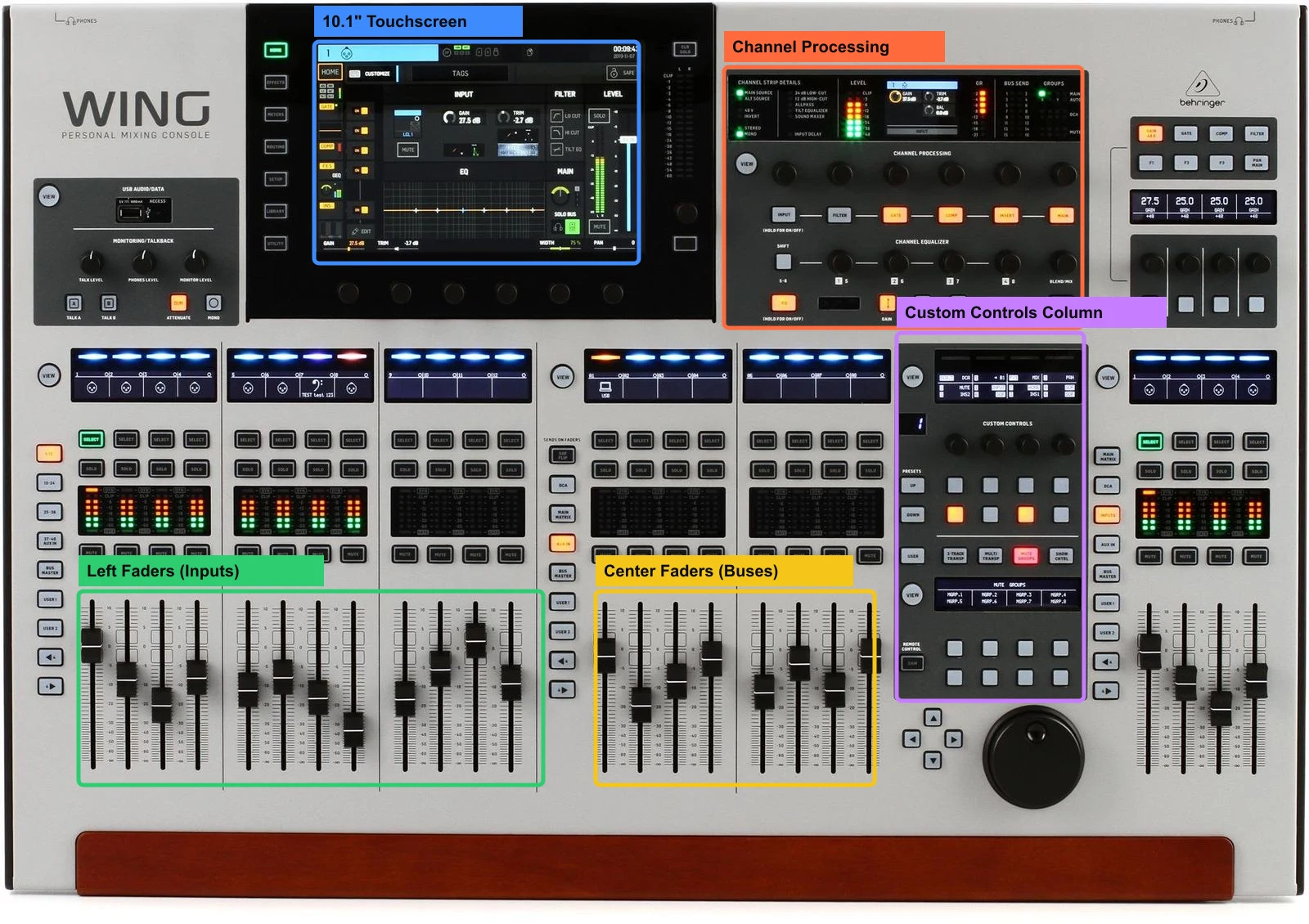
Here's a correction worth making up front, because it's a common misconception: the WING does not have a touchscreen on every physical channel strip. What it has is one central 10.1-inch capacitive touchscreen, mounted on a swivel so you can angle it toward you, plus a dedicated hardware channel strip to its right that mirrors whatever channel is selected. Below is a real breakdown of the five panels you'll use most, pulled straight from our WING Console Lab — the same interactive tool referenced throughout this guide.
10.1" Touchscreen (blue). The main UI — channel home, EQ, routing, FX, scenes, and meters, with a status bar showing channel name, clock, alerts, and SD/library shortcuts. Seven page keys run down the left bezel (HOME through UTILITY), and six touch encoders under the glass mirror whatever the bottom row of the current page shows.
Channel Processing (orange). This is the hardware channel strip for whichever channel is selected — seven processing blocks (INPUT, FILTER, GATE, COMP, INSERT, MAIN) plus a dedicated 4-encoder EQ section. Press a block's button to show it on the strip display; hold the button to switch that block on or off. The EQ section has its own logic: hold EQ to engage it, touch one of the four encoders to grab a band, and use SHIFT to reach the shelf bands. The recommended order of work, straight from the console's own workflow: gain stage first, then HPF/LPF, then EQ carve, then gate/compressor.
Left Faders — Inputs (green). Twelve motorized faders, normally holding channels 1–12. Layer keys beside this bank flip what the faders control (1–12, 13–24, 25–36, 37–40 + Aux In), and USER 1/2 give you two fully free-assign banks — any channel, bus, main, matrix, or even an FX parameter can sit on any fader here.
Center Faders — Buses (yellow). Eight faders for bus masters, monitor mixes, FX returns, and DCA groups. Press SOF FLIP (Sends on Faders, top of the middle button stack) and these eight faders instantly become that channel's sends to buses 1–8 — the fastest way to build a monitor mix without hunting through menus.
Custom Controls Column (purple). Up to four rotary knobs and eight keys that hold whatever must never disappear, regardless of what page the main touchscreen is showing — lead vocal level, FX tap tempo, talkback, a mute group. Assignments save as presets per show, venue, or operator, and the lower half adds pre-configured banks for the USB recorder, the WING-LIVE SD recorder, mute groups, and show control.
How Does Signal Flow Work on a Console Like the WING?
Every digital mixer, WING included, moves audio through the same basic stages: input gain, EQ and dynamics processing, routing to buses, and out to the main mix or monitor sends. Understanding this chain matters more than memorizing any single button, because every problem you'll troubleshoot on a live console traces back to one of these stages.
Signal enters at the preamp, where gain staging happens — this is the single most important setting on the whole console, and it's covered in the next section. From there it passes through each channel's EQ and dynamics (compressor, gate), gets routed to one or more of the WING's 28 buses (16 aux stereo, 8 matrix stereo, 4 main stereo), and finally reaches the main output that feeds the house speakers, plus whatever monitor sends go to the stage.
5 Fundamentals Every Beginner Should Learn First
Skip the full menu tour. These five things determine whether your first live mix on a WING goes well or badly.
1. Gain staging. Set input gain so the signal sits comfortably below clipping with headroom to spare, before you touch EQ or a fader. Every downstream decision — compression thresholds, EQ moves, how loud the fader needs to be — inherits whatever mistake you make here.
2. Scenes and snapshots. The WING lets you save a full console state — every fader, EQ, and routing setting — as a scene you can recall instantly. For anyone running the same show or set list repeatedly, building scenes in advance is the difference between a calm changeover and a scramble.
3. Bus and routing basics. With 28 buses available, it's easy to get lost. Start by understanding the difference between an aux bus (typically monitor sends), a matrix bus (post-main processing, often for zones or recording), and the main bus (the house mix) before building anything complex.
4. Monitor sends. Every input can feed one or more aux buses independently of the main mix — this is how a vocalist gets more of themselves and less of the drums in their in-ear or wedge monitor. Get comfortable adjusting a send level without touching the main fader.
5. Reading the channel-strip view. Tap any channel and the WING's central touchscreen shows that channel's full EQ curve, dynamics, and routing in one view. Learning to read that screen quickly — rather than hunting through it — is what separates a fast live mix from a slow one.
The fastest way to get comfortable with any of this before you're standing in front of a real console under pressure is to practice the layout hands-on. We built a free interactive WING Console Lab — click any of the 30+ zones on a real photo of the console, from the touchscreen down to the wood armrest, and get the exact explanation pulled straight from the WING's own manual.
Try it yourself on our Live Sound Engineering course page →
Common Beginner Mistakes on the WING
A few patterns show up repeatedly with anyone new to the console. Riding the fader instead of fixing the gain — if you're constantly pulling a channel up and down to control level, the input gain is set wrong, not the fader. Building scenes with routing baked in — a scene that hard-codes routing decisions breaks the moment your input list changes; keep routing separate from scene recall where you can. Ignoring the matrix buses — new users mix entirely on the main bus and never touch the matrix, missing an easy way to feed a lobby zone or a recording output without re-patching anything.
What This Guide Won't Teach You — Mixing Under Real Conditions
Knowing where the faders and buses live is the starting point, not the finish line. Real live mixing adds pressure this guide can't simulate: a vocalist wanting more of themselves in the monitor mid-song, a stage plot that doesn't quite match the patch sheet, feedback creeping in as a performer moves toward a wedge, and a soundcheck window shorter than you'd like. None of that shows up in a manual or an interactive lab — it shows up the first time you're at a WING with a live signal chain and real musicians depending on you.
That gap — from knowing the console to running a live mix on it — is exactly what PartyMap Academy's Live Sound Engineering course is built around. It's hands-on, studio-based training in real-time signal flow, monitor mixing with aux sends, multi-source mixing, and live-style session execution, all practiced on the same WING console covered in this guide.
Frequently Asked Questions
How much does the Behringer WING cost in India?
₹4,25,000. That places it above the standard Behringer X32 (₹2,69,800) and in the same range as the Allen & Heath SQ-6 (₹3,39,800–4,02,000) and Midas M32 Live (₹3,90,000–5,19,800), depending on the dealer.
Is the WING just the X32 with a touchscreen bolted on?
No. It's a newer architecture from the same engineering team, with 48 channels against the X32's 40, true any-to-any routing instead of block-based routing, and a central touchscreen replacing the X32's small-LCD-plus-encoder workflow.
Does the WING have a touchscreen on every channel strip?
No — a common misconception. There's one central 10.1-inch touchscreen. Each physical fader has its own small assignable display and rotary, but the full mixing interface lives in that single central screen.
What should a beginner learn first on the WING?
Gain staging before anything else, then scenes/snapshots, bus and routing basics, monitor sends, and reading the channel-strip view. Gain staging mistakes carry into every setting downstream.
Comfortable with the layout and ready to run a live mix on it? That hands-on jump — from knowing where the buttons are to mixing monitors and signal flow in real time — is exactly what we build in PartyMap Academy's 1-month Live Sound Engineering course in Mumbai, trained on the WING itself.
Sources: Behringer official WING product page, India retail listings (vplak.com, vmt.in, Soundglitz, ubuy.co.in — Google Shopping, July 2026), WING vs X32 comparison coverage (Drew Brashler, CollaborateWorship, Gear4music).